Getting Started
Creating a simple ROM
Let’s start by creating a sub-folder inside the roms directory.
cd roms
mkdir myrom
and adding a Makefile with the following contents:
include $(CONFIG_ROM)

LOCAL_ROM_NAME := myrom
LOCAL_SRC_FILES := myrom.c
include $(BUILD_ROM_32K)
For it to compile, we need to add a source file myrom.c:
#include "msx.h"
#include "sys.h"
#include "vdp.h"

void main()
{
  vdp_set_mode(MODE_GRP1);
  vdp_set_color(COLOR_WHITE, COLOR_BLACK);
  vdp_clear(0);

  vdp_puts(10, 10, "Hello MSX");

  for(;;);
}
Now we just need to run:
make
If everything goes well, a file myrom.rom will be created inside myrom/out/rom
and it can be run with openmsx.
openmsx myrom.rom
Adding game Assets
Let’s now add the following asset to myrom:
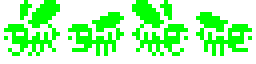
First edit the Makefile to specify the resources folder LOCAL_RES_DIR
and include the BUILD_RESOURCES build step:
LOCAL_RES_DIR := ./res
include $(BUILD_RESOURCES)
Now copy the asset image to myrom/res/spr and rebuild the rom:
make
A set of header files will be generated inside myrom/gen:
myrom.h
myrom_sprites.h
..
Those header files contain the compiled asset and are ready to be included in myrom.c:
#include "gen/myrom.h"
Animating Sprites
With the new asset included in myrom we can now attempt some animation using
the Sprite Module.
#include "msx.h"
#include "sys.h"
#include "vdp.h"
#include "sprite.h"
#include "gen/myrom.h"

#define PATTRN_BEE 0

SpriteDef bee_spr;

void main()
{
  uint8_t bee_states[] = {2,2}

  vdp_set_mode(MODE_GRP1);
  vdp_set_color(COLOR_WHITE, COLOR_BLACK);
  vdp_clear(0);
  spr_init();

  SPR_DEFINE_PATTERN_SET(PATRN_BEE, SPR_SIZE_16x16, 1, 2, bee_states, bee1);
  spr_valloc_pattern_set(PATRN_BEE);

  spr_init_sprite(&bee_spr, PATRN_BEE);
  spr_set_pos(&bee_spr, 100, 100);

  spr_show();

  for(;;);
}